First Things First--Scheduling your Time Using a Leadership Tool


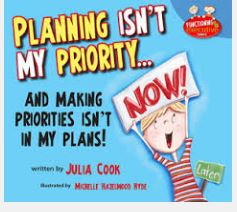
Our kiddos are really struggling this year with Time Management!  I have done this lesson for several years, but today, I decided to add a Leadership Tool from the Leader in Me, and it's made all the difference.  What I did was I provided the students a list of activities to do and they had to put them into the Time Matrix.  The one I created looks a little different than what Franklin Covey suggests, because it is in kid-friendly language. Another new spin I put on this lesson was I added Julia Cook's book "Planning isn't my Priority and Making Priorities isn't in My Plan!"  The kids love it!!!  It helped me introduce the word Priority and really got the conversation started about how to begin setting them.  

Comments

Popular posts from this blog

Habit 3: How to Prioritize

Grades K-1 Worksheet Grades K-1 Worksheet Grades 2-5 Worksheet

Growth Mindset: Extension Activity

Last week, we learned about having a Growth Mindset.  This week, I am hoping to go a little further with this topic by using this "Star Wars' clip.  I found this amazing website called Step-up 2 thrive .  This site does a lot of work with Mindset and is helping me find resources to support what I am doing in the classroom.  LESSON PLAN:  REVISED TO MEET MY STUDENTS' NEEDS Tell students to do the following: (WORKSHEET PROVIDED ) 1.  On the side labeled,   On the side labeled, "Things that are hard", list things that you struggle with, or challenge you.  In the column labeled, "Things I say to myself about doing these things," have students write phrases they may say to themselves when something becomes difficult.  Here are a few examples:  I can't Too Hard There's no Way It's too much This is gonna take forever 2..  Show video clip:  3.  After viewing clip, Have students answer the following questions...

Ga Ga over Google!

I knew that Google was amazing, but this year, I am learning even more amazing things that Google can do, and how to incorporate into my Counseling Program.  For starters, I have upgraded my School Counselor Request form and learned how to make it two or three forms in one.  I plan on doing a screencastify tutorial very soon!  This has been a game changer.  Now, students, teachers, and parents need only find one link in order to communicate their needs to me.  Next on my Google adventures is how I've been able to use Google Sites to develop Leadership Notebooks for all students in Grades 3-5.  Students are loving being able to add their data into this digital notebook, and I am certain this will be big selling point for parents when Student Led Conferences begin next month.  I helped all the students set up their site in Guidance this week, and they have each shared them with me.  This is allowing me to see right away how they are doing in their ...